Mouse acceleration significantly hinders performance in shooters, and Marvel Rivals is no exception. The game defaults to mouse acceleration with no in-game option to disable it. This guide explains how to manually disable it.
How to Disable Mouse Acceleration in Marvel Rivals
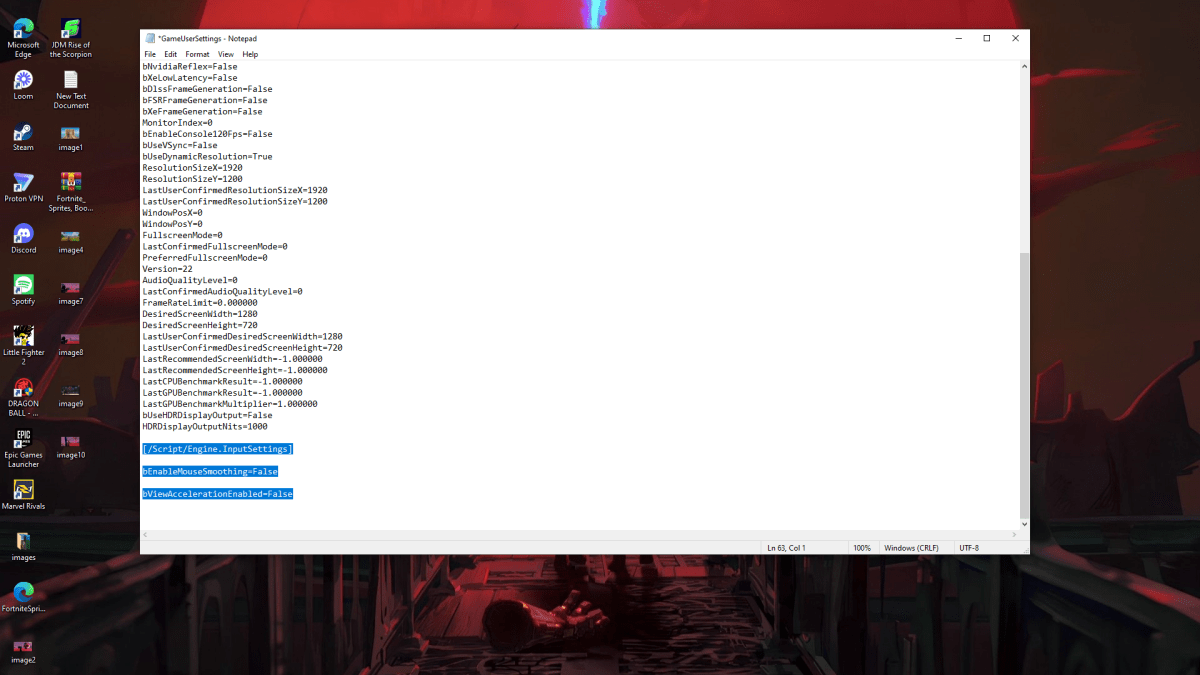
Because the game lacks an in-game setting, you must modify a configuration file. Follow these steps:
- Press Windows key + R, type
%localappdata%, and press Enter. - Locate the
Marvelfolder, then navigate toMarvelSavedConfigWindows. - Open
GameUserSettings.iniusing Notepad (or a similar text editor). - Add the following lines to the end of the file:
[/Script/Engine.InputSettings]
bEnableMouseSmoothing=False
bViewAccelerationEnabled=False- Save (Ctrl + S) and close the file.
- Right-click
GameUserSettings.ini, select "Properties," check "Read-only," and click "Apply" and "OK."
This disables mouse acceleration within the game. For optimal results, also disable it in Windows:
- In the Windows search bar, type "Mouse" and select "Mouse settings."
- Click "Additional mouse options" in the top right corner.
- Go to the "Pointer Options" tab.
- Uncheck "Enhance pointer precision."
- Click "Apply" and "OK."
You've now disabled mouse acceleration in both Marvel Rivals and Windows. Enjoy improved aim and consistent sensitivity!
Understanding Mouse Acceleration and Why It's Detrimental
Mouse acceleration alters your sensitivity based on mouse movement speed. Fast movements result in high sensitivity, slow movements in low sensitivity. While convenient for general use, this inconsistency is detrimental in shooters like Marvel Rivals.
Consistent sensitivity is crucial for building muscle memory and improving aim. Mouse acceleration prevents this by constantly changing your sensitivity.
With mouse acceleration disabled, you can now fully utilize your Marvel Rivals skills with linear and predictable aiming.
Marvel Rivals is available now on PS5, PC, and Xbox Series X|S.