Melon Sandbox is a physics-driven sandbox simulation that grants players the freedom to experiment, destroy, and create within an open world populated by diverse tools, objects, and characters. Whether you are building wild contraptions, testing ragdoll physics, or staging epic battles, mastering the game’s intricacies will help you design more engaging and interactive experiences. Let’s explore essential tips and tricks to help you get the most out of Melon Sandbox.
If you are just starting, be sure to check our Melon Sandbox Beginner’s Guide for a strong foundation.
Tip #1. Understand the Core Gameplay Mechanics and Controls
--------------------------------------------------------------
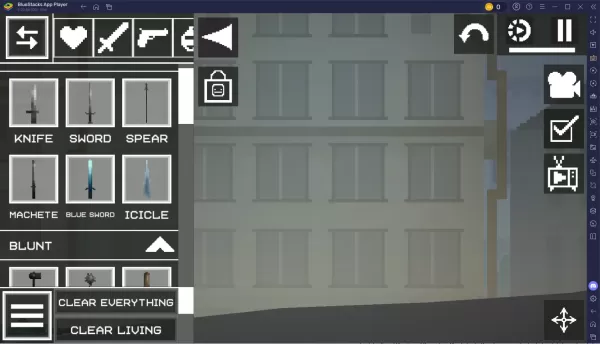
Before diving into complex builds, it is vital to familiarize yourself with the core mechanics. Melon Sandbox uses a drag-and-drop system where you place characters (such as Melons), weapons, tools, and environmental elements onto a blank canvas. Thanks to the game’s physics engine, every item interacts realistically.
Utilize the Object Library effectively. Take time to learn how items are categorized. Master basic controls: moving, rotating, resizing, and deleting objects. Use the Pause feature while arranging your scene to prevent premature interactions or falls.

Tip #5. Explore Maps and Creatives from Other Players
----------------------------------------------------
Melon Sandbox boasts a vibrant modding community. Adding mods significantly expands your possibilities. Install weapon packs, new maps, and character skins. Download community-created contraptions, machines, and arenas from online forums and platforms like the Steam Workshop. Always read mod installation instructions carefully, as compatibility may vary with game updates.
You can enjoy playing Melon Sandbox on a larger screen using your PC or Laptop via BlueStacks, taking full advantage of your keyboard and mouse.