Heim Nachricht As of now, Honkai: Star Rail does not officially support Mac natively, and there is no official version of the game available for macOS. However, you can still play Honkai: Star Rail on your Mac using BlueStacks, a popular Android emulator. Here's a step-by-step guide to help you set it up: ✅ How to Play Honkai: Star Rail on Mac via BlueStacks 📌 Step 1: Download and Install BlueStacks Go to the official BlueStacks website: https://www.bluestacks.com Download BlueStacks 5 (recommended for better performance). Open the downloaded .dmg file and install BlueStacks by dragging it to your Applications folder. 💡 Tip: Use the "High Performance" mode for smoother gameplay. 📌 Step 2: Set Up BlueStacks Launch BlueStacks from your Applications folder. Sign in with your Google account (required to access the Play Store). Wait for BlueStacks to initialize. 📌 Step 3: Install Honkai: Star Rail Open the Google Play Store inside BlueStacks. Search for "Honkai: Star Rail". Tap Install. Wait for the game to download and install. ⚠️ Note: The game may not appear in search results immediately. Try searching using the exact name: Honkai: Star Rail. 📌 Step 4: Launch the Game Once installed, find Honkai: Star Rail in your BlueStacks app list. Tap the icon to launch the game. Sign in with your HoYoverse account (create one if you don’t have it). 🎮 Tips for Better Performance on Mac Use a Mac with Apple Silicon (M1/M2/M3) for best performance (BlueStacks has native Apple Silicon support). Allocate more RAM and CPU in BlueStacks settings: Open Settings → Engine → Increase RAM to 4GB+ and CPU to 4 cores. Enable Hardware Acceleration in Settings. Close unnecessary background apps to free up system resources. ❗ Important Notes No official Mac version: The game is only officially available on Android, iOS, and PC (via the HoYoverse app). Account Sync: Your progress will sync across devices via HoYoverse account — so you can switch between phone and Mac. Game Updates: Make sure BlueStacks and the game are updated regularly. 🛠 Troubleshooting If the game crashes or fails to load: Restart BlueStacks, clear cache, or reinstall the game. If the Play Store doesn’t open: Try reinstalling BlueStacks or use a different Google account. ✅ Conclusion Yes, you can play Honkai: Star Rail on your Mac using BlueStacks, and it’s a solid workaround for Mac users who don’t have an iPhone or Android device. With proper settings, you’ll enjoy smooth gameplay and full access to all features. 🎮 Happy traveling across the stars! Let me know if you need help setting up BlueStacks or managing your HoYoverse account!

As of now, Honkai: Star Rail does not officially support Mac natively, and there is no official version of the game available for macOS. However, you can still play Honkai: Star Rail on your Mac using BlueStacks, a popular Android emulator. Here's a step-by-step guide to help you set it up: ✅ How to Play Honkai: Star Rail on Mac via BlueStacks 📌 Step 1: Download and Install BlueStacks Go to the official BlueStacks website: https://www.bluestacks.com Download BlueStacks 5 (recommended for better performance). Open the downloaded .dmg file and install BlueStacks by dragging it to your Applications folder. 💡 Tip: Use the "High Performance" mode for smoother gameplay. 📌 Step 2: Set Up BlueStacks Launch BlueStacks from your Applications folder. Sign in with your Google account (required to access the Play Store). Wait for BlueStacks to initialize. 📌 Step 3: Install Honkai: Star Rail Open the Google Play Store inside BlueStacks. Search for "Honkai: Star Rail". Tap Install. Wait for the game to download and install. ⚠️ Note: The game may not appear in search results immediately. Try searching using the exact name: Honkai: Star Rail. 📌 Step 4: Launch the Game Once installed, find Honkai: Star Rail in your BlueStacks app list. Tap the icon to launch the game. Sign in with your HoYoverse account (create one if you don’t have it). 🎮 Tips for Better Performance on Mac Use a Mac with Apple Silicon (M1/M2/M3) for best performance (BlueStacks has native Apple Silicon support). Allocate more RAM and CPU in BlueStacks settings: Open Settings → Engine → Increase RAM to 4GB+ and CPU to 4 cores. Enable Hardware Acceleration in Settings. Close unnecessary background apps to free up system resources. ❗ Important Notes No official Mac version: The game is only officially available on Android, iOS, and PC (via the HoYoverse app). Account Sync: Your progress will sync across devices via HoYoverse account — so you can switch between phone and Mac. Game Updates: Make sure BlueStacks and the game are updated regularly. 🛠 Troubleshooting If the game crashes or fails to load: Restart BlueStacks, clear cache, or reinstall the game. If the Play Store doesn’t open: Try reinstalling BlueStacks or use a different Google account. ✅ Conclusion Yes, you can play Honkai: Star Rail on your Mac using BlueStacks, and it’s a solid workaround for Mac users who don’t have an iPhone or Android device. With proper settings, you’ll enjoy smooth gameplay and full access to all features. 🎮 Happy traveling across the stars! Let me know if you need help setting up BlueStacks or managing your HoYoverse account!

by Claire Mar 10,2026

Absolutely — here's a polished and engaging version of your original content, optimized for clarity, readability, and marketing impact while preserving all key details:


Embark on a Galactic Adventure: Play Honkai: Star Rail on Your Mac with BlueStacks Air

The future of mobile gaming is here — and it's running flawlessly on Mac. With BlueStacks Air, players can now enjoy top-tier Android games like Honkai: Star Rail with unmatched performance, seamless integration, and breathtaking visuals. Developed by HoYoverse, Honkai: Star Rail is more than just a game — it’s a visually stunning, turn-based RPG that pulls you into a vast sci-fi universe where every decision shapes your journey across the stars.

And now, with BlueStacks Air, that journey begins on your Mac — effortlessly.


✨ Why Honkai: Star Rail Shines on Mac via BlueStacks Air

BlueStacks Air isn’t just another emulator. It’s a next-generation gaming platform built from the ground up for macOS, especially optimized for Apple’s powerful M-series chips. Here’s what sets it apart:

🌟 Native Android Performance

Experience the authentic feel of Honkai: Star Rail with minimal lag and maximum responsiveness. BlueStacks Air delivers smooth frame rates and instant load times — because every second counts when dodging enemy attacks.

💻 Apple Silicon Optimized

Leveraging Apple’s advanced M1, M2, and M3 chips, BlueStacks Air runs Honkai: Star Rail with exceptional efficiency. Whether you’re exploring the Astral Express or battling the enigmatic Dvalin, the game runs buttery smooth — no compromises.

🖥️ Retina Display Perfection

From glowing character auras to intricate environmental details, every pixel is rendered in stunning clarity. BlueStacks Air fully utilizes your Mac’s high-resolution Retina display, making the cosmos feel real.

🎮 Intuitive Controls Out of the Box

No complicated setup. BlueStacks Air comes with pre-configured keyboard and trackpad mappings, so you can dive straight into combat. Customize controls with ease to match your playstyle — whether you’re a precision strategist or a fast-paced tactician.

📚 Huge Game Library, Zero Limits

Beyond Honkai: Star Rail, BlueStacks Air opens the door to millions of Android games, all optimized for Mac. From strategy epics to casual adventures, your next favorite game is just a click away.
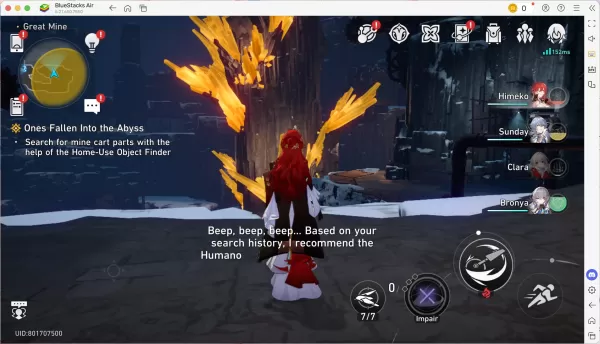

Begin Your Cosmic Journey in *Honkai: Star Rail* on Mac with BlueStacks Air


🚀 The Ultimate Gaming Experience Awaits

BlueStacks Air isn’t just about running Android games on Mac — it’s about elevating the experience. With Apple Silicon support, optimized graphics, and intuitive controls, it redefines what’s possible for Mac gamers.

Whether you’re a seasoned Trailblazer returning to the Astral Express or a newcomer stepping onto the cosmic journey for the first time, BlueStacks Air brings Honkai: Star Rail to life like never before.


🔥 Ready to Play? Launch Your Adventure Today

Don’t miss a single star in the sky.
👉 Download BlueStacks Air now and unlock the full potential of Honkai: Star Rail on your Mac.

The stars are calling. The journey begins — right on your Mac.


Recommended Reading:
For an in-depth look at how BlueStacks Air is transforming mobile gaming on Mac, check out the expert analysis from 9to5Mac — your trusted guide to Apple tech innovation.

Read the full review on 9to5Mac →


BlueStacks Air — Where Android Games Meet the Power of Mac.

Neueste Artikel Mehr+